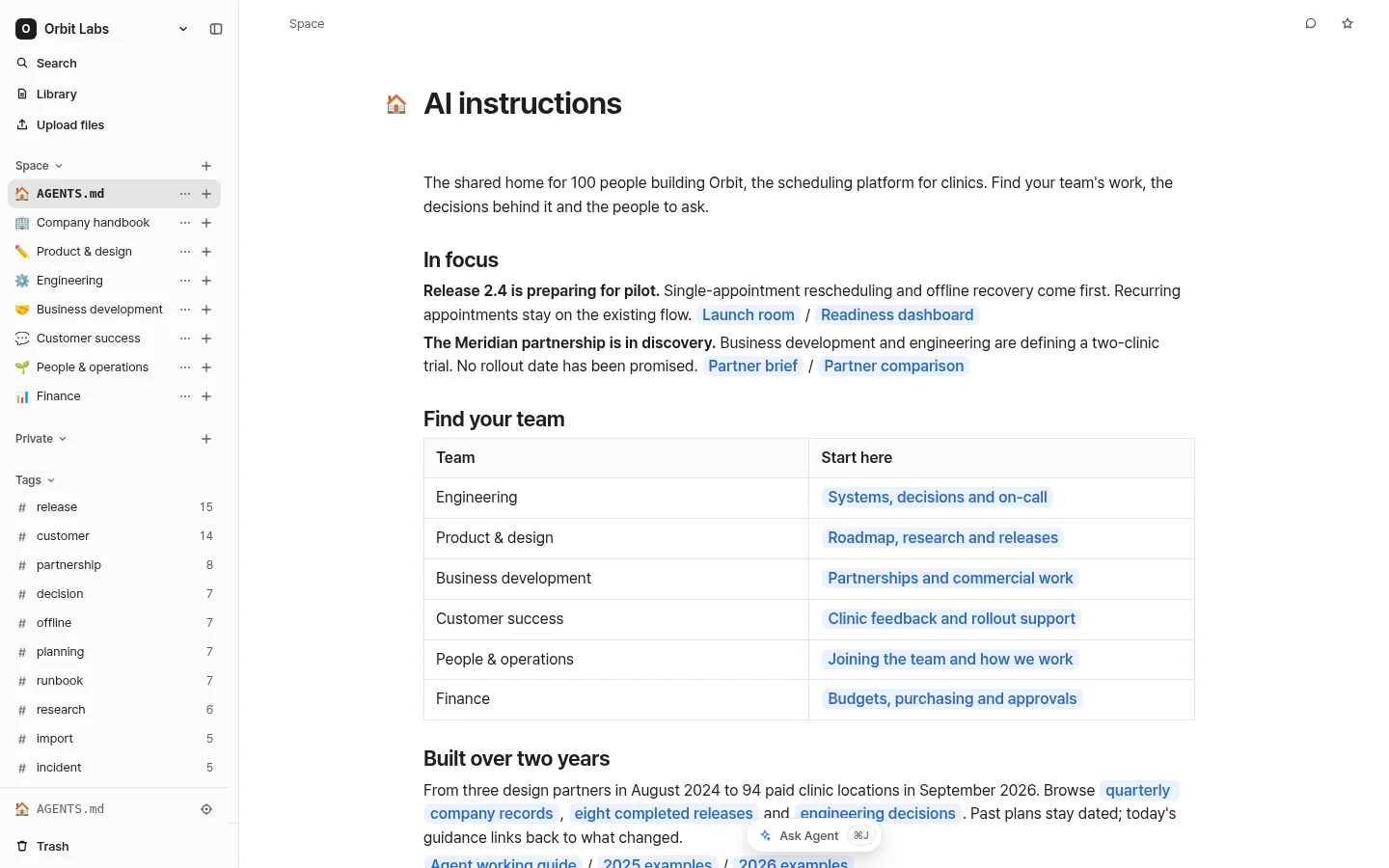
Agents sign in as you, so they see what you can see and nothing else. Select a Space by name and keep its working rules in AGENTS.md pages. Open one to read its AI instructions.
Coding agents
Claude Code, Codex, Cursor
Paste this prompt into an agent with a terminal. It installs the bn CLI and its skill, then signs you in.
Prompt
Connect yourself to But Noted so you can search, read and write documents in my Spaces.

1. Check that `node --version` is 24 or newer (install Node.js 24 if not), then install the CLI:
   npm install -g https://butnoted.com/cli/but-noted-cli.tgz
2. Run `bn setup --url https://butnoted.com`. It opens my browser to approve access and waits up to 5 minutes, so give it a long timeout or run it in the background. If no browser opens, show me the URL it prints.
3. Run `bn skill print` and follow that skill whenever I mention But Noted or ask for a doc, deck or prototype to share.
4. Tell me briefly what you can do now, naming my Spaces from the setup output.
Chat apps
Claude, ChatGPT
Add this URL as a remote MCP server, also called a custom connector, and sign in when the app asks. Ask to open a note or artifact right in the conversation.
Custom connector
Name
But Noted
Remote MCP server URL
https://butnoted.com/mcp
The built-in Agent
Already in the app
Ask about your Spaces or run several tasks at once. Add instructions while the Agent works. See live draft previews, stop tasks, and review or revert page changes. It reads and edits the same Space pages as connected agents. In the Mac app, choose Cloud or Local to decide where it runs.
Example turn
What did we decide about offline mode?
The later edit wins the time slot, and the notes merge. Priya is mocking up a banner.
Gemini 3.8 Flash
15.3k in398 out$0.011 ($0.009 × 1.2)
Meetings
Meeting transcripts, ready for your agents
The Mac app records your microphone and the call audio as separate tracks and tells speakers apart on your Mac. Speech is transcribed through But Noted’s servers, and transcripts are saved with your team’s pages, where people and agents can search them. After a meeting, you can correct transcript lines in place or delete a stretch of the conversation, and the audio stays on the device that recorded it. Use temporary cursor chat while viewing a document or meeting together.
Weekly product sync
Maya
What happens when two people edit the same appointment while they’re both offline?
Daniel
The later edit wins for the time slot, and the notes field merges.
Priya
Then the person whose time change lost needs to see it.
Meeting recordings and voice profiles stay on your computer; files you choose to upload are stored in your Space.
English and Korean transcription, even when a meeting mixes the two.
Live transcription and translation with adjustable text, a resizable memo and a transcript-only view. Share an updating transcript by link while recording, without the original audio.
Keep your memo and multiple sets of meeting notes together. Pick Auto, Brief or Action items, or manage your own writing presets in Settings. Notes get a title from the meeting content and Space conventions. Untitled recordings are named once the transcript is ready.
Models and cost
Choose the model, see what every turn costs
Search OpenRouter models by name, compare prices and context, or start with a recommended model. Choose from five reasoning levels. Every turn shows the model, tokens and cost.
Recommended models
Anthropic
Claude Sonnet 5.5
Claude Opus 5.5
Claude Fable 5.1
OpenAI
GPT-6.1 Sol
GPT-6 Astra
GPT-6 Luna
Google
Gemini 4 Argon
Gemini 3.8 Flash
Gemini 3.5 Flash Lite
xAI
Grok 4.6
DeepSeek
DeepSeek V4.1 Flash
Z.ai
GLM 5.3 Flash
$5AI credit to start
The first Space you create starts with it, and every plan has every feature.
1.2xThe provider’s price
AI usage is billed at this multiple, and every turn shows its cost.
5Providers for your own key
OpenRouter, Anthropic, OpenAI and Google for the Agent, Soniox for transcription. The provider bills you directly.
But Noted is a workspace for people and agents. Keep personal notes, meeting records, project docs and team references in your Spaces, alongside HTML artifacts such as decks, prototypes and charts. Artifacts carry what is asked of readers, a due date, the version and who published it; in the app, the label beside the title opens them. Reports sent for review use one reading format. Connected agents and the built-in Agent can also publish interactive pages, dashboards and small apps as mini apps. They send React source, and But Noted builds the page in But Noted styles. Admins set an accent color, font and logo once for artifacts that use But Noted styles. Design canvases can reuse components across screens and show cached previews. Select a screen and choose Try to click, type and scroll directly on the canvas; Done or Escape returns to browsing. Double-click inside a screen to select a component, then its text, and Ask Agent in the canvas toolbar sends the selection with your message. People edit it in the app, and AI agents read and write the same content with the signed-in person’s access. The app shows who is editing and previews the built-in Agent’s drafts. Each page keeps its version history: see who changed what, including which agent edited through MCP or the CLI, compare a version with the one before it, and restore an earlier version. Upload files from the sidebar or drop them into the tree. Files keep their original download, version history, sharing and comments. Read PDF, Office, text, images, media and archive previews within format and size limits; dedicated HWP/HWPX previews are not supported. Upload alone never starts paid OCR, vision or transcription. Request it directly from the Agent for a selected page or clip using your chosen model and provider. Library brings together the accessible pages, meetings, files and artifacts in the current Space, with type and tag filters and a Starred view, and each item shows whether everyone in the Space, specific people or only you can open it. Star a page, meeting, file or artifact with the star at the right of its header or from its page menu, and it stays under Starred at the top of the sidebar in the order you starred it. Stars are only yours and do not change sharing. People and agents can both add tags, and on web and desktop the sidebar lists the current Space’s tags. Each document lists its subpages automatically; links in the body do not change their location. Recents keeps the same list across devices for your account and Space. It appears after ten entries and stays visible when an entry moves to Trash. On mobile, hold a row to open its page menu.
Can I follow someone’s work?
On web and desktop, click a collaborator’s avatar in a note to follow their cursor. Artifacts show live pointers and can follow canvas movement, zoom, prototype screens, slides and page scrolling. Scroll, start editing or press Escape to stop following. In a document or meeting, press Command + / on Mac or Ctrl + / on Windows and Linux to open cursor chat. Only people viewing the same page see it. Enter clears the message, Escape closes chat, and messages fade 5 seconds after typing stops without being saved.
How do links and mentions work on mobile?
Tap a link or page mention to open it. Use the pencil button to enter edit mode at the same scroll position; autosave and live sync continue while you edit. Type @ or use the @ button in the formatting toolbar to mention a page or person. Find people by name or, when you have member access to the Space, email. Switch Spaces from the list at the top of Settings.
Can I resize photos or collapse parts of a page?
Yes. On web and desktop, paste or drop an image into a page, or choose Image from the / menu. Images upload to your Space without appearing in the sidebar or Library, and display on mobile and public pages. Select a photo and drag the handle on its right edge. Type / and choose Toggle list to add a title with content you can collapse and expand. Select text and use Turn into to change its format, including several blocks at once. Paste a web URL onto selected text to turn it into a link while keeping its wording and formatting. An empty line hints at / for commands and @ to mention people or pages. Photo sizes and toggle states are saved with the page.
Can pages include diagrams and charts?
Yes. On desktop and web, type / in a page and choose Diagram or Chart. On mobile, add a code block and choose mermaid or vega-lite as its language. Mermaid diagrams and Vega-Lite charts can be read and edited on all three. The page shows the drawing instead of the code, and Edit source opens the code with a preview. Select an image or drawing in a document to enlarge it. A chart uses only the data written in its block. Drawing happens on your device without network requests, and the app keeps each drawing so the page opens with it next time. Connected agents and the built-in Agent can write the same blocks. Slides and HTML artifacts also render Mermaid and Vega-Lite source as static drawings, without preparing image files. For a chart people can interact with, ask the agent for a mini app.
Can I find text inside a page?
Yes. On web and desktop, press ⌘F (Ctrl F on Windows) in a document, meeting or artifact. Every match is highlighted, Enter moves to the next one, and closing with Esc leaves the current match selected. In a file, ⌘F moves to the search box of the file viewer.
Which AI agents can connect to But Noted?
Coding agents with a terminal, such as Claude Code, Codex and Cursor, connect through the bn CLI and its skill. Chat apps such as Claude and ChatGPT connect to the remote MCP server at https://butnoted.com/mcp. Open saved notes, browse slides and follow citations in the conversation. Published web apps run inside the card when the chat app allows embedded sites. External agents select a Space before loading its AGENTS.md instructions, searching, browsing Library or creating top-level content. AGENTS.md opens as “AI instructions” in the app. When reading a document, they receive the applicable AGENTS.md pages from the Space root to its location, with versions so unchanged instructions need not be read again in the same context. They pass its exact name on those calls, or its id when names repeat. Existing document or parent ids identify their own Space. Agents can edit just the relevant text with exact string replacements, keeping the rest of a long document intact. The cloud Agent works in the app without setup. Add instructions while it works; they join the current task, and you can edit or delete them until the Agent picks them up. In the Mac app, choose Cloud or Local in the Agent message box. Local runs the Agent on that Mac. A phone connects to the Mac by scanning the QR code shown on the Mac. Model requests still go to your selected provider through the But Noted server proxy.
How do I move pages between Space and Private?
Drag a page onto Space or Private in the sidebar, or use Move to. Use the page title icon on web, desktop or mobile to choose an icon or emoji, browse emoji categories, search in English or Korean, or reset it to the default. Moving under another page inherits its sharing settings. Open Share on a subpage to change its audience directly or return to its parent’s settings. The app asks you to confirm access changes, and subpages with their own sharing settings keep them. For a page in your sidebar, Show in sidebar in its Recents row menu or desktop tab’s right-click menu expands the tree to where the page is. On web and desktop, the header of a document, meeting, artifact or file in the sidebar shows its section and parent pages.
Can a connected agent see everything?
No. An agent acts as you and sees only the Spaces and pages you can see. Disconnecting it in Settings revokes its access.
Can I sign in without an email link?
Yes. Add a passkey in Settings → Profile, or create one after signing in with an email link. Your device or password manager verifies you with a fingerprint, face or device unlock. But Noted never receives your biometric information or private key, and emails you whenever a passkey is added. You can manage and delete passkeys in the same settings. App reviewers with a dedicated review account can choose App review sign-in in the mobile app.
Can I share a page or a meeting without asking people to sign in?
Yes. In Share, choose Anyone with the link. Recipients can read without signing in and use Share in the title bar to send the link to someone else. You can also share a meeting while recording; its synced transcript text refreshes as the meeting continues, and the same link works afterward. Original audio stays on the recorder’s device. Choose Invited people or Space members to stop public access on the next refresh.
How does But Noted record meetings?
The Mac app records your microphone and the call audio as separate tracks and tells speakers apart on your Mac. Soniox transcribes the speech through But Noted’s servers. During a meeting, you can resize the memo and the live transcript on web and desktop. Recorders and attendees on web, desktop and mobile can adjust transcript text size or fill the meeting view with the transcript alone. Select the language pair to change translation settings. Original recordings stay on your computer. Once the transcript is ready, recordings without a chosen title are named from their content and Space conventions.
Which languages does But Noted support?
English and Korean, in the app and in transcription, including meetings that switch between the two languages.
Which AI models can I use?
You can search and use models that support Agent tools on OpenRouter, with recommended models from Anthropic, OpenAI, Google, xAI, DeepSeek and Z.ai. You pick the built-in Agent’s model, and every turn shows the model, tokens and cost.
Can I use my own API key?
Yes. Add a key from any of OpenRouter, Anthropic, OpenAI and Google for the Agent, and a Soniox key for transcription. Usage on your own key is billed by that provider.
How much does But Noted cost?
The first Space you create starts with $5 of AI credit, which its members share. AI usage is billed at 1.2x the provider’s price, and every turn shows its cost. Every plan, including Free, has every feature; plans differ only in storage. Usage on your own key is billed by that provider instead.
Where is my data stored?
Pages, uploaded File originals and previews, and synced meetings are stored on But Noted’s servers, which run on Cloudflare. Automatically captured meeting recordings and voice profiles stay on your Mac. Uploaded HTML may load external HTTPS resources while viewed. Soniox processes speech for transcription. Agent requests are sent from But Noted’s servers through OpenRouter to the model’s provider, or to the provider whose key you add. Error reports from the web and desktop apps go to Sentry, and you choose in Settings whether they include diagnostics.
Which platforms does But Noted run on?
The Mac app runs on Apple Silicon Macs with macOS 14.2 or later, and the web app runs in any modern browser. On a Mac, choose whether links open in the desktop app automatically, or continue in the browser from the opening screen. Visit the download page to join the iOS or Android beta. The Windows app is coming soon.
Start your workspace
Start on the web right away, or get the Mac app to record meetings.